An IEP team meeting in a school conference room: a special education teacher holds a laptop showing the IEP document while an assistive technology specialist explains an AT recommendation to a general-education teacher and a parent.

Assistive Technology in an IEP: A Guide for Teams

Assistive technology in an IEP is any device or service that helps a student with a disability access learning. Learn what IDEA requires and how teams choose tools.


Find out more about
Assistive Technology
Will Jackson, CEO
June 10, 2026
, last updated on
June 10, 2026
,
6
min read

Assistive technology in an IEP is any device, software, or service that helps a student with a disability access learning and make progress on their goals. Under federal law, assistive technology is something every IEP team must consider. This guide explains what assistive technology in an IEP means, how the law treats it, the types available, and how teams decide what a student needs.

What Is Assistive Technology in an IEP?

Assistive technology in an IEP is any tool or support that increases, maintains, or improves how a student with a disability functions at school. The Individuals with Disabilities Education Act (IDEA) requires every IEP team to consider whether the student needs assistive technology, and any agreed supports become part of the IEP.

Assistive technology is one piece of the broader support landscape covered on our assistive technology for students overview.

AT Devices vs AT Services

IDEA covers two related things. An assistive technology device is the tool itself, such as a text-to-speech app, word prediction, or a communication board. An assistive technology service is the help a student needs to use it, including evaluation, setup, and training.

Both matter: a device without training often goes unused, so a strong IEP names the tool and the support around it.

Types of Assistive Technology

Assistive technology is often grouped by complexity, from low-tech to high-tech:

  • Low-tech: simple, no batteries, such as pencil grips, highlighters, and visual schedules.
  • Mid-tech: simple electronics, such as audiobooks, timers, and talking calculators.
  • High-tech: software and devices, such as text-to-speech, speech-to-text, and communication devices.

Higher tech is not automatically better. The goal is the lightest tool that lets the student do the task independently.

How Teams Decide: The SETT Framework

Many teams use the SETT framework to consider assistive technology systematically. SETT stands for Student, Environment, Tasks, and Tools: look at the student needs, the environments they work in, the tasks they must do, and only then the tools that fit. Starting with the student rather than the device keeps the decision grounded in real needs. The CAST approach to accessible learning reflects the same student-first logic.

How Mote Supports AT Goals in an IEP

Mote provides several supports that often appear in IEPs, delivered through one Chrome extension that works across Google Workspace. Read Aloud (text-to-speech) supports reading access, speech-to-text lowers the writing barrier, and the built-in dictionary supports vocabulary. Because it runs on the Chromebooks and Google tools many schools already use, Mote can make IEP-driven supports available on every device without extra hardware.

The Bottom Line

Assistive technology in an IEP is not optional to consider: IDEA requires it. Think in terms of devices and the services that support them, start with the student rather than the gadget, and choose the lightest tool that builds independence. For schools on Google Workspace, Mote can deliver common reading and writing supports across every device.
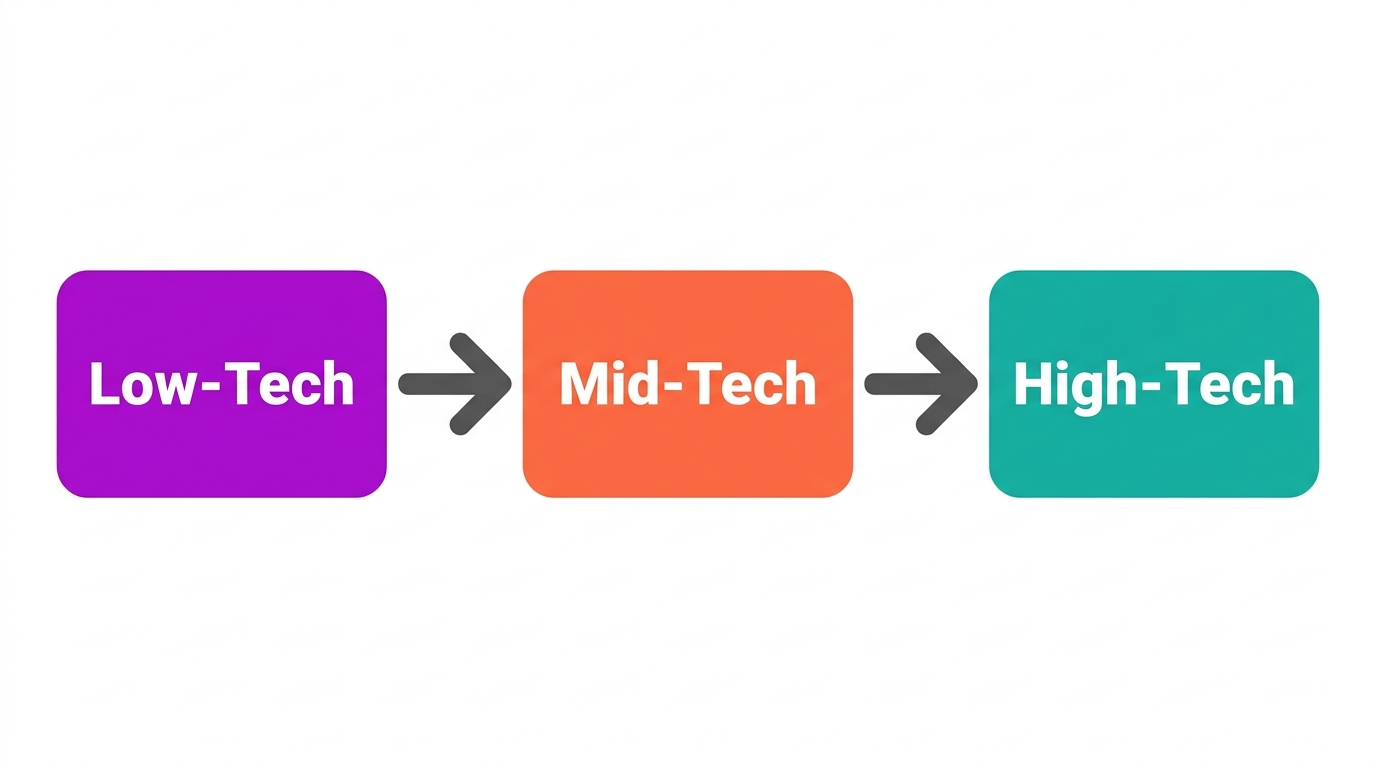
Diagram of the assistive technology continuum: low-tech, mid-tech, high-tech.
Assistive technology ranges from low-tech to high-tech tools.

How to Add Assistive Technology to an IEP

Requires:
Mote Chrome Extension, an AT consideration framework such as SETT, the IEP document

1. Start with the Student and Tasks

Use a framework like SETT to identify what the student needs to do and where they struggle before naming any tool.

2. Request an AT Evaluation if Needed

If the team is unsure, ask for an assistive technology evaluation to match needs to tools.

3. Trial the Tool

Let the student try the device or software in real tasks to confirm it helps before committing.

4. Write It into the IEP

Document the device and the services, such as training, so the support is required and provided at no cost.

5. Review and Adjust

Revisit the AT at each IEP meeting and change it as the student needs and tasks change.

Diagram of the SETT framework: student, environment, tasks, tools.
The SETT framework guides assistive technology decisions.

Frequently Asked Questions

Common questions about
Assistive Technology

Qu'est-ce que la technologie d'accessibilité dans un PEI ?

La technologie d'accessibilité dans un PEI est tout appareil, logiciel ou service qui aide un élève en situation de handicap à accéder à l'apprentissage et à atteindre ses objectifs. Selon la loi fédérale, l'équipe du PEI doit examiner si un élève a besoin de technologie d'accessibilité, et tous les soutiens convenus sont inscrits dans le PEI.

La technologie d'adaptation doit-elle être prise en compte dans un PEI ?

Oui. La Loi pour l'éducation des personnes en situation de handicap (IDEA) exige que chaque équipe du PEI envisage si l'élève a besoin de dispositifs et de services de technologie d'adaptation. L'examen est obligatoire, même si l'équipe peut décider qu'aucune technologie d'adaptation n'est nécessaire.

Quelle est la différence entre un appareil de technologie d'assistance et un service de technologie d'assistance ?

Un appareil de technologie d'assistance est l'outil réel, comme une application de synthèse vocale ou un tableau de communication. Un service de technologie d'assistance est le soutien qui aide un étudiant à l'utiliser, y compris l'évaluation, la formation et l'aide technique continue. La loi IDEA définit et couvre les deux.

Quels sont les exemples de technologies d'aide dans un PEI ?

Les exemples vont des outils simples comme les poignées de crayon et les surligneurs aux aides technologiques avancées telles que la synthèse vocale, la dictée vocale, la prédiction de mots et les dispositifs de communication augmentée. L'outil approprié dépend de l'élève, de son environnement et des tâches qu'il doit accomplir.

Qui paie la technologie d'assistance dans un PEI ?

Lorsque la technologie d'assistance est inscrite au PEI d'un élève, le district scolaire est responsable de la fournir gratuitement à la famille. Cela comprend l'appareil et les services nécessaires pour l'utiliser efficacement à l'école.

Essayez Mote gratuitement

Aucune carte requise

© Mote Technologies, Inc. 2026. Conçu avec 💜 par notre équipe mondiale.