Mote PDF

Mote PDF lets you access, edit and save any PDF, and use all of Mote's reading and writing tools.
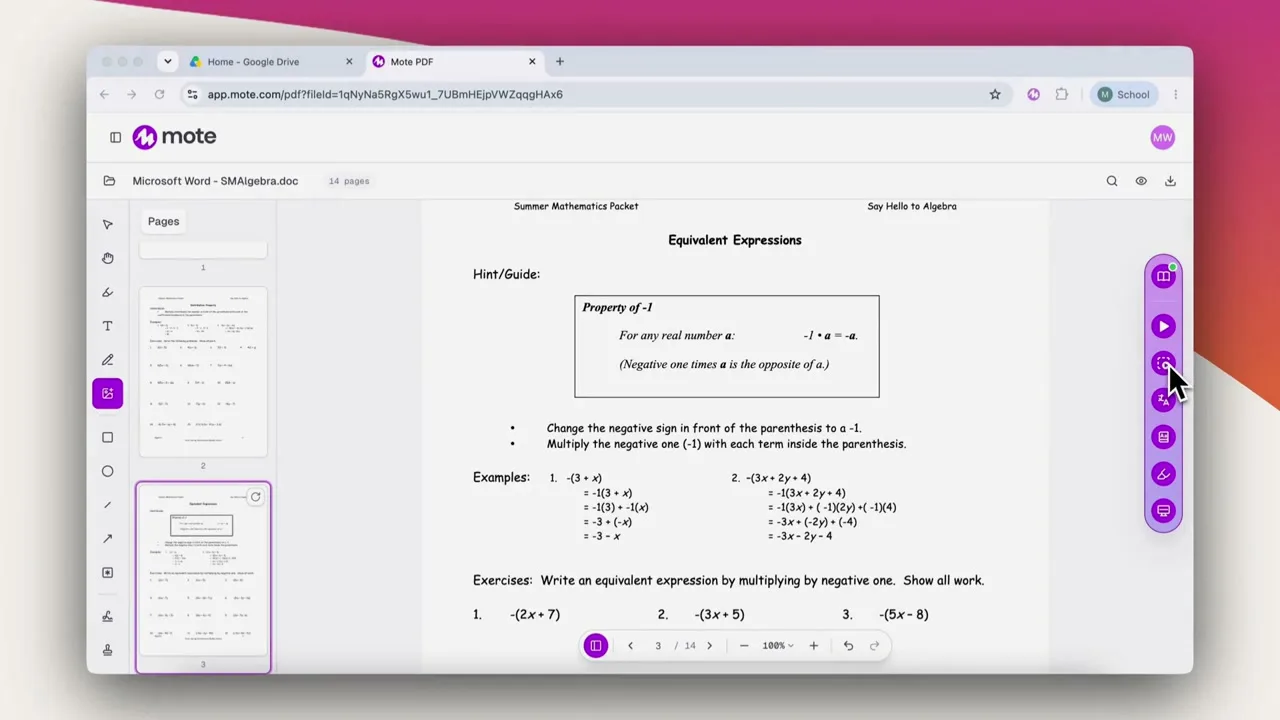

The Mote Sidebar open on a webpage
https://media.mote.com/marketing/products/mote-pdf-what-it-is.mp4
  • Google for Education Partner
  • WCAG AA
  • FERPA
  • COPPA
  • GDPR
  • EU-U.S. Data Privacy Framework

Trusted by over 25,000 schools and more than 2 million users

Albany ISD logo.Aurora Public Schools logo.Benton School District logo.Bialik Hebrew Day School logo.Cape Breton Victoria Regional Centre for Education logo.Hauppauge Union Free School District logo.Irvington Union Free School District logo.LEO Academy Trust logo.Mannheim School District 83 logo.Milford public schools logo.Mooresville Consolidated School Corporation logo.New Canaan High School logo.NISD logo.Prisma Online School logo.Sylvan Union School District logo.The Fletcher School logo.Twin Lakes School Cooperation logo.Wappingers Central School District logo.Williamsville Central School District logo.Wilmington Public Schools logo.
Any PDF

Make any worksheet, article, or textbook accessible.

For students

Hear any PDF read aloud, including scanned documents.

Translate a passage, or look up a word they do not know.

Highlight, annotate, or type on the page, and save the file with the changes.

For teachers

Share a scanned worksheet with your class and get completed work back.

Use the materials you already have, and know every student can read them.

Have students read, answer and mark up their own copy and hand it back.

What it is

Mote PDF is a web app to access, edit and save any PDF. Open a document and Mote checks it first, telling you whether it is accessible, inaccessible, or a scan. If it is only a picture of a page, Mote uses OCR to read the words and turn them into real text. Students can then use all of Mote's reading and writing tools to read aloud, translate a passage, look a word up, or reduce distractions with the Screen Mask. They can work on it too: highlight, annotate, drop in text boxes, and sign and date it, all saved as proper PDF annotations that travel with the file.

Key Features

Whatever state the PDF is in

An accessible PDF

Already tagged and readable, so the whole toolkit works from the moment it opens.

An inaccessible PDF

Mote flags it, then OCR rebuilds the text so the document becomes accessible and the whole toolkit works on it.

A scan

Detected as soon as it opens. OCR reads the words off the picture and turns them into real text.

A photo of a page

Same treatment as a scan. The words come off the image and behave like any other text.

How to get started

Open a PDF, and the whole Mote toolkit comes with it.

01

Sign up to Mote

02

Go to Mote PDF

03

Upload a PDF

04

Scan it

05

Start annotating and reading

Create a Mote account. You can sign in with Google or ClassLink, so there is no separate password to remember.

Mote PDF lives on the Mote app. Nothing to install before you open a document.

Drop in a worksheet, an article or a page from a textbook, or open one straight from Google Drive.

If the document is only a picture of a page, Mote offers to run OCR on it. The words come off the image and become real text, so Read Aloud, Translation, the Dictionary and the Screen Mask all work on a document that gave a student nothing before.

Hear it read aloud, translate a passage, then highlight, annotate, add text boxes, and sign and date it. Click save to Google Drive when you're finished, and everything saves as proper PDF annotations that travel with the file.
What Teachers Say

Rebecca Oravec, Wrightson Ridge School
Star rating.Star rating.Star rating.Star rating.Star rating.
Rebecca Oravec
Professeur d'éducation spécialisée
Hannia Santacruz, Darlington Community School District
Star rating.Star rating.Star rating.Star rating.Star rating.
Hannia Santacruz
Enseignante d'anglais langue seconde (5e à 8e année)
Brenda Lomanno, Wilmington Middle School
Star rating.Star rating.Star rating.Star rating.Star rating.
Brenda Lomanno
Spécialiste de l'intégration des technologies
Heather S Badger-Brown, The Academy Way Virtual School
Star rating.Star rating.Star rating.Star rating.Star rating.
Heather S Badger-Brown
Éducatrice
Lindenhurst Union Free School District logo
Star rating.Star rating.Star rating.Star rating.Star rating.
Edward Langone
Spécialiste des technologies éducatives
Toledo Public Schools logo
Star rating.Star rating.Star rating.Star rating.Star rating.
Michelle Buck
Professeur de collège
Thornton Township High School District 205 logo
Star rating.Star rating.Star rating.Star rating.Star rating.
Veronica Guerrero
Professeur d'éducation spécialisée
Jennifer Janik
Star rating.Star rating.Star rating.Star rating.Star rating.
Jennifer Janik
Professeur d'éducation spécialisée
Central Community Unit School District 301 logo
Star rating.Star rating.Star rating.Star rating.Star rating.
Andi Gerharz
Professeur et coach pédagogique

Designed to support

Mote & Apprenants Divers

Administrateurs Scolaires

Traduction Vocale et Textuelle

Common questions

Fonctionne-t-il sur les PDF numérisés ?

Oui. Mote vérifie chaque PDF que vous ouvrez et vous indique s'il est accessible, inaccessible ou un scan. Si c'est un scan, il vous propose de lancer l'OCR pour que le texte puisse être lu à voix haute, traduit et sélectionné.

Le document corrigé fonctionnera-t-il avec un lecteur d'écran ?

Oui. Mote le reconstruit en tant que document correctement structuré, avec de véritables titres, listes, tableaux et informations linguistiques, balisé selon la norme d'accessibilité PDF/UA. Ce n'est pas une image avec du texte caché derrière.

Dois-je télécharger le PDF en premier ?

Non. Téléversez-le directement dans Mote PDF, ou ouvrez-le à partir de Google Drive : cliquez avec le bouton droit sur le fichier, choisissez Ouvrir avec, puis sélectionnez Mote. Rien à télécharger ou à convertir d'abord.

Les surlignages et les notes restent-ils sur le document ?

Oui. Elles sont enregistrées en tant qu'annotations PDF réelles plutôt que comme une couche d'image superposée, de sorte qu'elles persistent et restent avec le fichier.

Les élèves peuvent-ils remplir une feuille de travail sans l'imprimer ?

Oui. Ils peuvent taper sur la page, ajouter des zones de texte, ajouter une signature et une date, puis enregistrer le résultat.

Essayez Mote gratuitement

Aucune carte requise

© Mote Technologies, Inc. 2026. Conçu avec 💜 par notre équipe mondiale.