


Writing support that finds the spelling, homophone and grammar issues in a student’s writing. It doesn’t fix them, it explains the rule behind each one and leaves the fixing to the student.
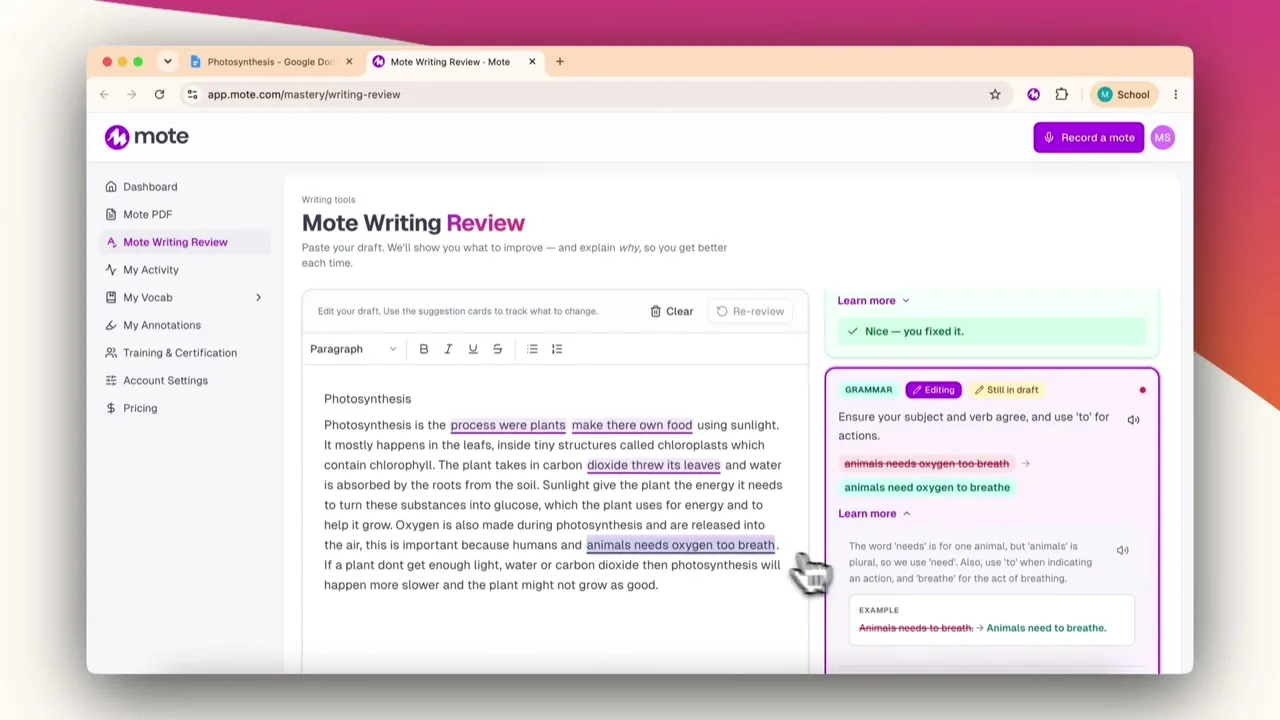




















Review writing from any webpage, including Google Docs.
See a list of suggested changes, and the reason behind each one.
Complete edits independently, then recheck to confirm they are fixed.
Encourage independent review of writing.
Cover spelling, homophone and grammar errors all in one review.
Ensure students can explain their work, not have a tool write it for them.
Writing Review is Mote's writing-support product, in the Sidebar's Writing Mode. It helps students through the writing process, checking for spelling, homophones, and grammar. Every issue it flags comes with an explanation. Writing Review teaches rather than auto-corrects, so the student understands what they have changed and why.
Highlight your writing and click review my writing to send it to Mote.
No need to highlight or copy and text, just click review my writing and its sent to Mote.
The review catches homophones like there and their, and explains which one the sentence needs.
Spelling, homophones and grammar in one pass, each with a plain-language explanation.
Write, review, and understand every fix.
01
Add Mote to Chrome
02
Open a piece of writing in Google Docs
03
Send it to writing review
04
Check for any issues
05
Read the explanation and make the change
Install the Chrome extension and sign in with Google or ClassLink SSO.
Open a Google Doc that's filled with text.
Open the Sidebar, navigate to Writing Mode and click the 'review my writing' button.
Click 'review my writing' and look through the list of suggestions.
Open any suggestion to see what the issue is and why it matters, with a before and after example. Make the change yourself and click "I've fixed it".
.png)

Non. L'évaluation signale ce qui pourrait être amélioré et explique pourquoi, mais c'est l'élève qui effectue chaque modification. Rien n'est réécrit à sa place.
Orthographe, homophones et grammaire. Chaque suggestion s'accompagne d'une explication en langage clair du problème et d'un exemple avant et après.
Partout où un étudiant écrit sur le web. Surlignez un brouillon sur n'importe quelle page et envoyez-le à la révision, ou bien envoyez-le directement depuis un Google Doc sans rien surligner d'abord.
Un correcteur orthographique corrige. Cela explique, pour que l'apprenant comprenne pourquoi une modification est nécessaire et puisse décider par lui-même.


