Text-to-Speech with Mote
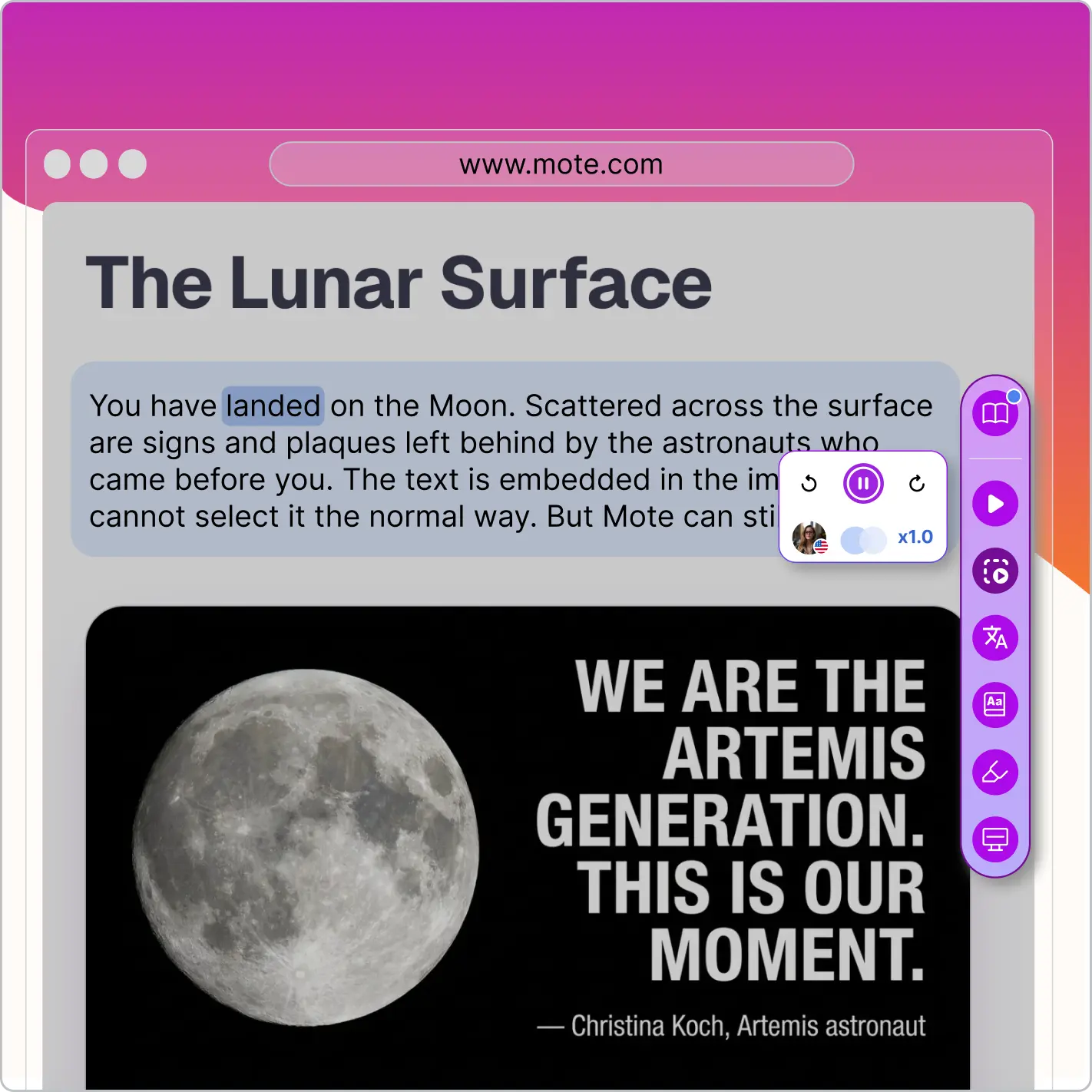
Text-to-speech technology gives every student independent access to written content through natural-sounding audio. Mote brings TTS directly into Google Workspace and across any web page, alongside highlighting, translation, and a complete reading support toolkit.
Text-to-Speech in K-12 Classrooms
Text-to-speech (TTS) technology converts written content into spoken audio, giving students with dyslexia, attention challenges, English language learning needs, and other reading differences an independent way to access grade-level material. According to the National Center for Education Statistics, 7.5 million students receive special education services under IDEA, with specific learning disabilities representing the largest category at 32% of that population. For many of these students, the gap between what they can understand and what they can decode on their own is significant - and TTS bridges that gap.
The Mote Chrome extension brings text-to-speech into Google Workspace for Education with a single click and natural-sounding voices across 60+ languages. Beyond TTS, Mote offers a suite of reading, writing, and communication tools for students and teachers - all aligned with Universal Design for Learning principles and built for real classrooms.
Mote Offers Complete Text-to-Speech for Classrooms

Natural AI Voices
Students stay engaged when the voice reading to them sounds like a real person. Mote Read Aloud delivers clear, natural-sounding voices across 60+ languages, with adjustable speed and pitch so each student can find a pace that works for them. A third grader working through a science passage can slow the voice down to absorb new vocabulary, while a confident reader reviewing their own essay can speed it up.

Native Google Workspace Integration
When a student opens a Google Doc in class, reading support should already be there - not three clicks and a new tab away. Mote works inside Google Docs, Slides, Forms, Classroom, and Gmail without switching applications. There is no separate login, no new interface to learn, and no IT setup beyond the Chrome extension.

Multilingual Reading Support
A fourth grader who recently arrived from Guatemala should not have to choose between understanding the lesson and building English skills. With natural voices across 60+ languages and live translation built in, Mote lets multilingual learners hear content in their home language while following along in English - or the other way around.

Reading Comprehension Toolkit
Hearing words read aloud is a starting point, not the finish line. Mote pairs Read Aloud with a highlighter for marking key passages, a screen mask that dims surrounding content to reduce visual overload, and a built-in dictionary that provides definitions without leaving the page - all from a single Chrome extension.

Writing Support That Connects to Reading
A fifth grader with dyslexia finishes reading a chapter using Read Aloud, then needs to write a response. Mote keeps the momentum going: text prediction offers spelling suggestions as students type, voice typing lets them dictate ideas, and then they press Read Aloud to hear their own draft back - catching errors they might miss visually.

Built for District-Wide Deployment
A special education coordinator with 200 IEPs specifying text-to-speech accommodations needs a tool that works at scale. Mote is FERPA, COPPA, and GDPR compliant with signed Data Processing Agreements. Domain-wide rollout through Google Admin Console means every student gets access without individual installation, with usage analytics to verify accommodations are being delivered.
Why Text-to-Speech Matters in Education
The Evidence Behind TTS in the Classroom
A meta-analysis published in the Journal of Learning Disabilities by Wood, Moxley, Tighe, and Wagner examined 22 studies on text-to-speech and reading comprehension for students with reading disabilities. The analysis found a positive weighted effect size of d = 0.35 (95% CI [.14, .56], p < .01), with between-subject studies showing stronger effects at d = 0.61. These findings provide evidence that TTS is a meaningful support for students who struggle with decoding, not merely a convenience.
The International Dyslexia Association states that text-to-speech technology "can be as vital for students with dyslexia as a screen reader is for someone who is visually impaired." IDA recommends a dual approach that combines direct reading instruction with assistive technology access, noting that AT "has the potential to increase learner motivation, prolong focus, and build confidence." This aligns with Mote's approach of providing TTS alongside explicit comprehension tools rather than as a standalone accommodation.
Beyond students with identified disabilities, TTS supports the broader classroom through Universal Design for Learning. CAST's UDL Guidelines identify TTS as a core implementation of the principle of multiple means of representation, describing audio transformation of text as "among the most easily accomplished methods for increasing accessibility." When all students have access to Read Aloud, the tool becomes a normal part of classroom learning rather than something that singles out individual learners.
Explore more of
Text-to-Speech with Mote
How to Use Read Aloud in the Classroom: A Teacher's Guide
Text-to-Speech for Dyslexia: How TTS Supports Student Reading
What Is Text-to-Speech? A Complete Guide for Educators
Best TTS Chrome Extensions for Education
Text to Speech in Google Docs
Best Text-to-Speech Tools for Education
Frequently Asked Questions About Text-to-Speech
Common questions about using text-to-speech tools in K-12 classrooms.
What are the best free text-to-speech tools for schools?
Several TTS tools offer free tiers for educational use. Mote provides free access to Read Aloud with natural AI voices across 60+ languages, along with a highlighter, screen mask, and dictionary inside Google Workspace. Google Docs includes a basic built-in screen reader. NaturalReader offers a limited free web reader. Read Aloud (the standalone Chrome extension) provides simple browser-based TTS. For schools running Google Workspace for Education, Mote is the most complete free option with native Classroom integration.
Is using text-to-speech in the classroom considered cheating?
No. Text-to-speech is a recognized educational accommodation, not a shortcut. TTS changes how students access content, not what they learn. Under IDEA and Section 504, TTS is a legitimate support for students with documented reading disabilities. Many educators also use TTS as a Universal Design for Learning (UDL) strategy available to all students, since it supports comprehension and engagement across diverse learning profiles.
Does text-to-speech help students with dyslexia?
Yes. A meta-analysis published in the Journal of Learning Disabilities found that TTS produces a positive effect on reading comprehension for students with reading disabilities (effect size d = 0.35). TTS allows students with dyslexia to access grade-level content independently by bypassing decoding difficulties. When paired with word-level highlighting, TTS creates bimodal reading support that reinforces the connection between written and spoken language.
Can I use text-to-speech in Google Docs on a Chromebook?
Yes. Google Docs' built-in TTS works on Chromebooks but is limited to English and select regions. Chrome extensions like Mote add full text-to-speech with 60+ languages on any Chromebook. For school-managed devices, administrators can deploy Mote across all Chromebooks through Google Admin Console.
Can text-to-speech be added to an IEP or 504 plan?
Yes. Text-to-speech is one of the most commonly included assistive technology accommodations in IEPs and 504 plans. Under IDEA, schools are required to consider assistive technology for every student receiving special education services. TTS is typically documented as a reading accommodation, allowing students to have written materials read aloud during instruction and assessment. Tools like Mote make district-wide deployment straightforward with centralized admin controls and signed Data Processing Agreements.
Is text-to-speech only for special education students?
No. While TTS is essential for students with documented reading disabilities, it benefits a much wider population. English Language Learners use TTS to hear correct pronunciation and build vocabulary. Students with ADHD use it to maintain focus during extended reading tasks. Research on Universal Design for Learning (UDL) shows that providing multiple means of representation, including audio, supports all learners. Mote is designed as a universal classroom tool, not just a special education accommodation.
Will text-to-speech delay a child's reading development?
No. Research does not support the concern that TTS prevents students from developing reading skills. The International Dyslexia Association recommends a dual approach that combines direct reading instruction with assistive technology access. TTS removes barriers to content comprehension while students continue building decoding skills through explicit instruction. In practice, many students gain confidence and motivation when they can access age-appropriate material independently through TTS.
What is the difference between text-to-speech and speech-to-text?
Text-to-speech (TTS) reads written content aloud, converting text into audio. Speech-to-text (STT), also called voice typing or dictation, does the opposite by converting spoken words into written text. TTS supports reading and comprehension, while STT supports writing and expression. Many students benefit from both tools together. Mote includes both Read Aloud (TTS) and voice typing (STT) in a single Chrome extension, giving students complete literacy support for reading and writing.
What is text-to-speech and how does it work?
Text-to-speech (TTS) is assistive technology that converts written digital text into natural-sounding spoken audio. TTS software uses neural voice synthesis to read content aloud from documents, web pages, and applications. In classrooms, students activate TTS with a single click to hear assignments, articles, and instructions read in a clear voice while following along visually. Tools like the Mote Chrome extension bring TTS directly into Google Docs and Google Classroom without requiring separate software.
Last updated on
March 1, 2026
{"@context":"https://schema.org","@type":"FAQPage","mainEntity":[{"@type":"Question","name":"What are the best free text-to-speech tools for schools?","acceptedAnswer":{"@type":"Answer","text":"Several TTS tools offer free tiers for educational use. Mote provides free access to Read Aloud with natural AI voices across 60+ languages, along with a highlighter, screen mask, and dictionary inside Google Workspace. Google Docs includes a basic built-in screen reader. NaturalReader offers a limited free web reader. Read Aloud (the standalone Chrome extension) provides simple browser-based TTS. For schools running Google Workspace for Education, Mote is the most complete free option with native Classroom integration."}},{"@type":"Question","name":"Is using text-to-speech in the classroom considered cheating?","acceptedAnswer":{"@type":"Answer","text":"No. Text-to-speech is a recognized educational accommodation, not a shortcut. TTS changes how students access content, not what they learn. Under IDEA and Section 504, TTS is a legitimate support for students with documented reading disabilities. Many educators also use TTS as a Universal Design for Learning (UDL) strategy available to all students, since it supports comprehension and engagement across diverse learning profiles."}},{"@type":"Question","name":"Does text-to-speech help students with dyslexia?","acceptedAnswer":{"@type":"Answer","text":"Yes. A meta-analysis published in the Journal of Learning Disabilities found that TTS produces a positive effect on reading comprehension for students with reading disabilities (effect size d = 0.35). TTS allows students with dyslexia to access grade-level content independently by bypassing decoding difficulties. When paired with word-level highlighting, TTS creates bimodal reading support that reinforces the connection between written and spoken language."}},{"@type":"Question","name":"Can I use text-to-speech in Google Docs on a Chromebook?","acceptedAnswer":{"@type":"Answer","text":"Yes. Google Docs' built-in TTS works on Chromebooks but is limited to English and select regions. Chrome extensions like Mote add full text-to-speech with 60+ languages on any Chromebook. For school-managed devices, administrators can deploy Mote across all Chromebooks through Google Admin Console."}},{"@type":"Question","name":"Can text-to-speech be added to an IEP or 504 plan?","acceptedAnswer":{"@type":"Answer","text":"Yes. Text-to-speech is one of the most commonly included assistive technology accommodations in IEPs and 504 plans. Under IDEA, schools are required to consider assistive technology for every student receiving special education services. TTS is typically documented as a reading accommodation, allowing students to have written materials read aloud during instruction and assessment. Tools like Mote make district-wide deployment straightforward with centralized admin controls and signed Data Processing Agreements."}},{"@type":"Question","name":"Is text-to-speech only for special education students?","acceptedAnswer":{"@type":"Answer","text":"No. While TTS is essential for students with documented reading disabilities, it benefits a much wider population. English Language Learners use TTS to hear correct pronunciation and build vocabulary. Students with ADHD use it to maintain focus during extended reading tasks. Research on Universal Design for Learning (UDL) shows that providing multiple means of representation, including audio, supports all learners. Mote is designed as a universal classroom tool, not just a special education accommodation."}},{"@type":"Question","name":"Will text-to-speech delay a child's reading development?","acceptedAnswer":{"@type":"Answer","text":"No. Research does not support the concern that TTS prevents students from developing reading skills. The International Dyslexia Association recommends a dual approach that combines direct reading instruction with assistive technology access. TTS removes barriers to content comprehension while students continue building decoding skills through explicit instruction. In practice, many students gain confidence and motivation when they can access age-appropriate material independently through TTS."}},{"@type":"Question","name":"What is the difference between text-to-speech and speech-to-text?","acceptedAnswer":{"@type":"Answer","text":"Text-to-speech (TTS) reads written content aloud, converting text into audio. Speech-to-text (STT), also called voice typing or dictation, does the opposite by converting spoken words into written text. TTS supports reading and comprehension, while STT supports writing and expression. Many students benefit from both tools together. Mote includes both Read Aloud (TTS) and voice typing (STT) in a single Chrome extension, giving students complete literacy support for reading and writing."}},{"@type":"Question","name":"What is text-to-speech and how does it work?","acceptedAnswer":{"@type":"Answer","text":"Text-to-speech (TTS) is assistive technology that converts written digital text into natural-sounding spoken audio. TTS software uses neural voice synthesis to read content aloud from documents, web pages, and applications. In classrooms, students activate TTS with a single click to hear assignments, articles, and instructions read in a clear voice while following along visually. Tools like the Mote Chrome extension bring TTS directly into Google Docs and Google Classroom without requiring separate software."}}]}



